
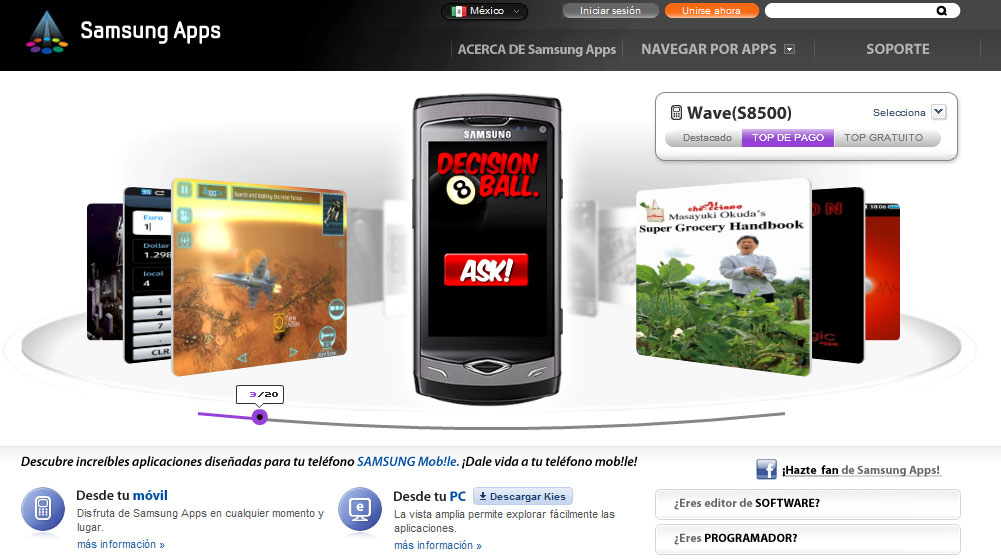
And my other App, Real Decision Ball (also on Palm Pre & Pixi, Android & Samsung bada) is now number 3 in Mexican Market.
Showing posts with label zombies. Show all posts
Saturday, September 4, 2010
Zombie Eliminator & Real Decision Ball on bada
My Zombie Eliminator (first mobile game in 16 languages, available on Palm Pre & Pixi, Android & Samsung bada) was today on place 20. (out of near 1800) in 'top 50 paid apps' in Chinese Samsung Apps Store, 32. in Italian & Mexican, 44. in Australian and 46. in Turkish. I feel gently honored:).

And my other App, Real Decision Ball (also on Palm Pre & Pixi, Android & Samsung bada) is now number 3 in Mexican Market.
Tuesday, July 20, 2010
Adapting to newer devices
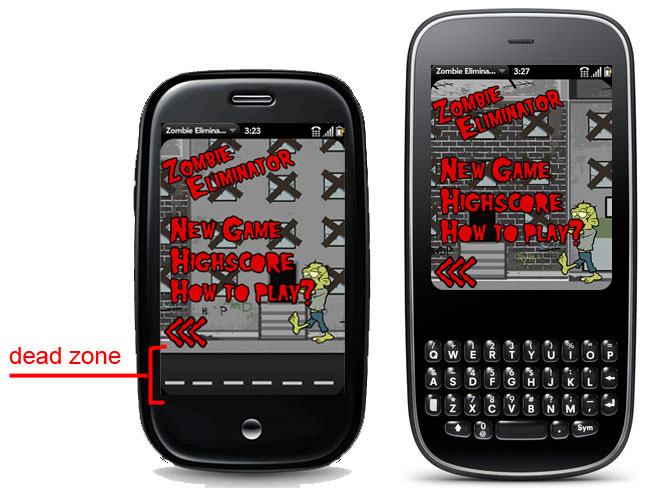
After PRE, the next device introduced by PALM was called PIXI. It's one big mystery why newer, more complex and forward-looking device has smaller screen size than its predecessor. Nowadays, when mobiles has all the time more and more additional goodies, it's at least not really clever. But if we want to get to the widest audience our apps need to be flexible. Because I was anxious at the time, I chose the simplest way to run my Zombie Eliminator also on Pixi - I just make 80px height 'dead zone' on the bottom. It is visible on PRE and hidden on PIXI. Simple & working.

I recommend also nice art about Effective Design for Multiple Screen Sizes by Bryan Rieger at Mobi forge.
Tuesday, July 13, 2010
First touch with Palm Pre
My 'Zombie Eliminator' is now ready to download for your PalmPre phone in official Palm App Catalog. Twelve levels of pure fun served in sixteen languages. Check it:
Monday, May 24, 2010
"Impossible is nothing" 4th day, Only a week more.
After first tests on mobile device my game seems to work. I've done basic logic such as displaying player, simple map (with locations and moving between them) and player control - with collisions with the environment. Tomorrow i will work on enemies (finally, ZOMBIES!) and survivors. I want to finish engine in next two days and use rest of the time to build world, expanded with many locations and put final graphics on. I already found graphic designer with enough free time in that week to make some sprites and tiles - meet Kuba from HighColors. And meet first Zombie I've ever seen - 1st location guy from Resident Evil (it was 1996 on PSX)

And one technical aspect of designing tileset-based map movement. Let us consider map created from simple array with '0' as road and '1' in the role of wall, e.g.

With yellow fields as roads, red walls & dark blue dot as sprite's 0,0. We can see that 0 point of the sprite is on the road but the sprite itself is traveling on the wall. So I got the idea of adding one more point to that, i call it x2, like that:

And because of kind of isometric (or oblique) view I use ('will use', because it's hard to say about perspective if i have only semi-colored squares as background), i don't have to introduce additional point in Y-s. It looks good when character is standing in front of the wall like on screen below (like in the old Pokemon games for gameboy).
Ok, I will return to developing now, because, paraphrasing George Bernard Shaw (I don't really remember how it was originally), "Able is creating, unable is teaching" , and I always find writing blogs as a kind of teaching:).
And one technical aspect of designing tileset-based map movement. Let us consider map created from simple array with '0' as road and '1' in the role of wall, e.g.
Movement and collision detection are easy if we want our character just 'jump' from one cell to another. We need then simply calculate if destination tile is not '1'type (wall).
map[0] = [];
map[0].push([0, 0, 1, 0, 0, 0, 0]); //0
map[0].push([0, 0, 1, 0, 0, 0, 0]);
map[0].push([0, 0, 1, 0, 1, 1, 0]); //2
map[0].push([0, 0, 0, 0, 0, 0, 0]);
map[0].push([0, 0, 1, 0, 1, 0, 0]); //4
map[0].push([0, 0, 1, 0, 1, 0, 0]);
map[0].push([1, 1, 1, 0, 1, 0, 0]); //6
map[0].push([0, 0, 0, 0, 1, 0, 0]);
map[0].push([1, 1, 1, 1, 1, 1, 1]); //8
map[0].push([0, 0, 0, 0, 0, 0, 0]);
It gets complicated when we want it to take smaller steps, what is necessary if we want animation. For example our player moves 9px each step in 50px big tile. Because DOM coords are calculated from top-left corner, we can observe case in which our character is moving 'on the wall', like that:
var x = (player.xPosition/tileSize) + deltaX,
//if we move along X axis deltaX is 1 or -1 and deltaY is 0
y = (player.yPosition/tileSize) + deltaY;
//and vice versa in here
if (map[actualMapIndex][y][x] !== 1) {
//move player
} else {
displayFunnyWallHitAnimation();
}
With yellow fields as roads, red walls & dark blue dot as sprite's 0,0. We can see that 0 point of the sprite is on the road but the sprite itself is traveling on the wall. So I got the idea of adding one more point to that, i call it x2, like that:
I add 1/5 size of the tile to the 0.0 point, and 4/5 for another one. It's because my sprite has a little free, transparent space from each size. In practice it looks like that:
var x = ((player.xPosition+tileSize*0.2)/tileSize) + deltaX,
x2 = ((player.xPosition+tileSize*0.8)/tileSize) + deltaX
y = (player.yPosition / tileSize) + deltaY;
if (map[actualMapIndex][y][x] !== 1 && map[actualMapIndex][y][x2] !== 1) {
//move player
} else {
displayFunnyWallHitAnimation();
}
And because of kind of isometric (or oblique) view I use ('will use', because it's hard to say about perspective if i have only semi-colored squares as background), i don't have to introduce additional point in Y-s. It looks good when character is standing in front of the wall like on screen below (like in the old Pokemon games for gameboy).
Ok, I will return to developing now, because, paraphrasing George Bernard Shaw (I don't really remember how it was originally), "Able is creating, unable is teaching" , and I always find writing blogs as a kind of teaching:).
Subscribe to:
Posts (Atom)